New from Anthony Hayes: Aha Studio
Get found by the people searching for what you sell.
Local SEO and Google Business Visibility › Build Local Landing Pages and Visibility
Location page strategy
Location pages rank when each one answers a real local question with its own details, and a city name swapped into a template doesn't do that. This opening covers the five steps to build a unique page per city or neighborhood without creating thin duplicate content, plus a quick checklist you can use before you publish.
Most location pages I've seen are the same page with a different city name in six places, and that's the reason they don't rank.
If you're searching for location pages that rank for local searches, the problem is almost never the keyword. It's that Google has no reason to pick one page over the other six that say the same thing.
Here's the thing: each town page needs a reason to exist, and that matters more than how many words it has.
In this post, you'll get a five-step process for building a location page that's actually different from its siblings.
You'll learn how to decide which places deserve their own page, what makes a page unique enough to be worth indexing, and how to write it so it reads like it was written for that place. You'll also get the two things that keep pages from going thin after they're live.
I've been building marketing software since 2011, and I build the local landing pages inside my tools with AI. The rule I stick to is simple: if a page can't name something specific to its location, it doesn't get published.
We'll start with the easiest decision of all, which is which locations are worth a page in the first place.
The list below covers the key points.
- Pick locations that earn a page: only build where real demand and a real local offer exist.
- Give every page a unique reason to exist: one local angle that no other page on the site can claim.
- Write it as a local page: use place-specific details that a template with a swapped name could never contain.
- Tie each page to a real local presence: an address, a service area, or actual people who work there.
- Keep the pages from thinning out: review them on a schedule and add what's changed locally.
The rest of the post walks through each of these in order.
Find this useful? Add us as a preferred source on Google and more of what we publish will show up in your results.
Step 1: Decide which locations deserve their own page
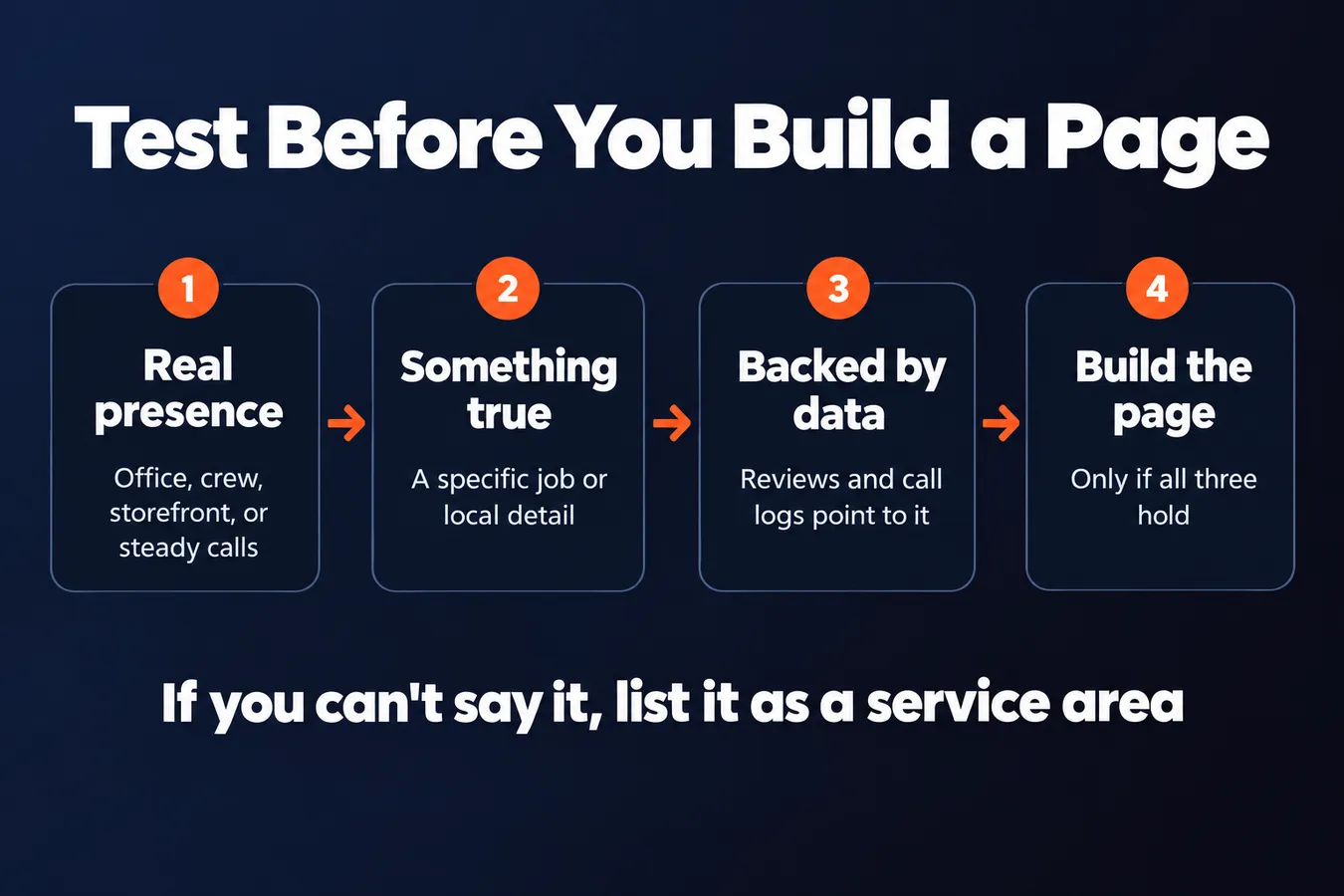
Start with places where you have a real business presence. That means an office, a crew that works there, a storefront, or a steady number of customers who already find you and call. If you don't have any of those in a place, a page about it is a guess.
Here's a quick test. Can you say something true about this place that you couldn't say about the next one? A specific job you did on a particular street, a local permit quirk, the fact that your crew is based two miles away and can be there in twenty minutes, or a reviewer who mentioned the neighborhood by name. If you can't come up with anything, the place is probably best handled as a service area mention. List it in your service area copy and move on.
Neighborhoods inside a big city can work, but only if there's real local demand and something specific to say. Searchers in Brooklyn and Manhattan often use different words, and in Los Angeles or San Diego the difference between Downtown and Santa Monica can matter a lot to a customer. Still, a neighborhood with three past jobs and no local detail will read as filler. Check your reviews and call logs before you decide. If a neighborhood keeps coming up in them, that's a signal.
I'd rather see ten strong pages than fifty thin ones. Fifty pages sounds like more coverage, but most of them will say the same thing with a different city name swapped in. Google doesn't need that, and neither does the person reading it. Pick the places where you can back up every paragraph, then build out from there.
Step 2: Give each page a unique reason to exist
Here's the test I use: if you could swap the city name on a page and nothing else would break, the page isn't doing any work. Google sees the same thing, and so does the person searching.
Start with the local problems you actually solve. A plumber in Queens deals with older buildings, cast iron stacks and landlords who want the job done yesterday. A roofer in San Diego is dealing with a completely different set of problems. Write about those problems in plain terms, like which housing stock is common, what the weather does to the job, or how the local permit office tends to run. Those details are hard to fake, and they're hard to copy.
Then add what you've actually seen. A photo of your crew on a job two streets over beats a stock image every time. Name the file something descriptive, like crew-replacing-water-heater-flatbush-brooklyn.jpg, not IMG_4471.jpg. Mention the street you're on most often and roughly how long it takes to reach downtown from your yard. Those details prove you're really there.
Landmarks and roads matter too. A customer in Sunset Park will recognize the Gowanus Expressway or Fourth Avenue. Naming those is how both readers and search engines work out where you operate. Use the names people actually use for the places around them.
Last, check that each page has something the others don't. If you're writing twelve pages, keep a note of what each one covers that the rest don't. If you can't fill that note for a page, that page probably shouldn't exist yet.
Step 3: Write the page so it reads as a local page
Start with the URL. Something like /plumbing/brooklyn/ tells both the search engine and the visitor what the page is about before anyone reads a word. Keep it short, lowercase, and free of random numbers.
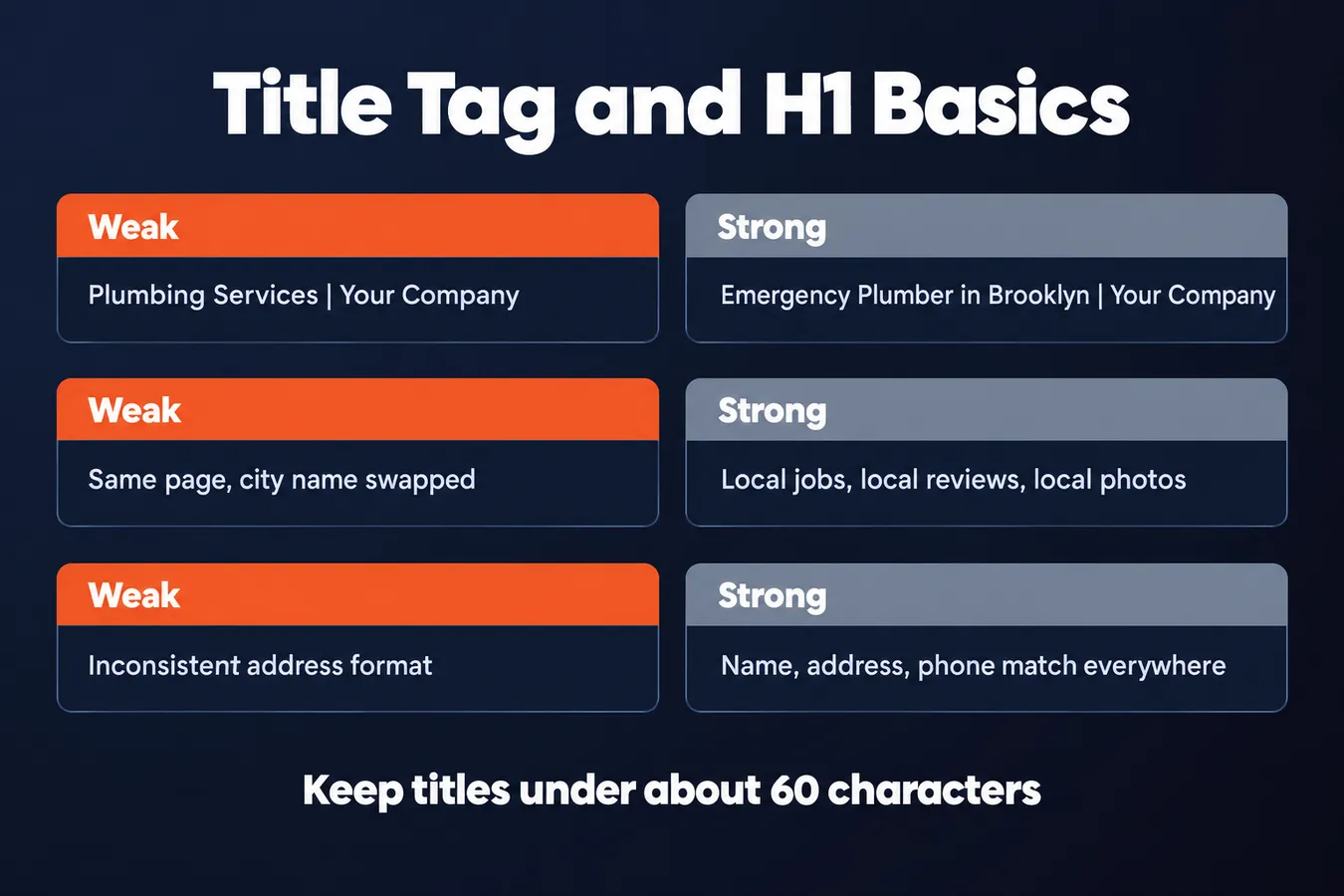
Next, the title tag. Lead with the service and the place, then your brand. "Emergency Plumber in Brooklyn | Your Company" does the job. Keep it under about 60 characters, or Google will cut it off in the results.
Use one H1 that names both the service and the location. After that, your H2s should answer the questions a local customer actually types or asks on the phone: how fast can you get here, do you work on weekends, what does a visit cost, which neighborhoods you cover. If you can't answer a question with something specific to that area, leave the heading out.
Local search in New York, Los Angeles or San Diego works differently than in a small town. In a big city, people are often searching by neighborhood rather than by city. A Brooklyn page should name Park Slope or Bay Ridge where that's true for your business, and a San Diego page should be honest about which parts of the county you actually reach. Don't stuff every neighborhood in the metro into one page. Pick the ones you truly serve.
Your name, address and phone number need to match everywhere.
Put them in the same format on every page of the website, in the footer or contact section. Then check them against your Google Business Profile, your Facebook page, and any directory listings. "Suite 4" on one site and "#4" on another looks like two different businesses to a search engine. Inconsistent details are one of the easiest local SEO problems to fix and one of the most common I see, so do this before you touch anything else on the page.
Keep the location in the content too, but write it for a person. A short paragraph about the jobs you've done in that area, the reviews from those customers, and photos taken on local jobs will do more than a list of city names repeated down the page. Link to your Google reviews and your Facebook page from the location page so customers can check you out before they call.
Step 4: Connect each page to a real local presence
Google needs to see that a location is real before it will show your page in the local pack. A page that talks about plumbing in Brooklyn means little on its own. A page tied to a verified business location, with a map, reviews and a clear address, gives Google something to check.
Embed the map for that location and link to its Google Business Profile.
Each location page should have an embedded Google map pointing to that exact address. If you have a separate Google Business Profile for each location, link each page to its own profile, and keep each one tied to its own page. Mixing them up sends mixed signals about which address belongs to which page.
Show reviews that name the place.
Generic testimonials like "Great service, would recommend" don't do much for a local page. Reviews that mention a neighborhood, a street or the local team do more work, because they tie the business to that specific area. Pull in ratings from that location's profile where you can, so the numbers on the page match what Google sees.
Real customers in real places are the strongest signal you can give. Don't make up reviews or write them yourself, because Google is good at spotting that and the customers will notice too.
Add LocalBusiness schema with the address, service area and opening hours.
Schema markup won't rescue a weak page. What it does is remove doubt about what the page is about. Tell search engines the business name, street address, service area and hours in structured data, and the page is much easier to match to the right searches.
Keep the schema consistent with your Google Business Profile. If the hours on the page say 9 to 5 and the profile says 8 to 6, you've created a conflict you don't need.
Once the location pages have their own maps, reviews and schema, the next question is whether other sites point to them. That's covered in Link Building for Local SEO.
Step 5: Keep the pages from going thin over time
A location page isn't finished when it goes live. Stale pages slowly lose ground, and that matters more than the first launch. Check regularly whether the page about your Brooklyn office still reflects the Brooklyn office a year later, because search engines tend to notice when a page stops changing.
Plan a small refresh every few months. Add a new job, a photo, or a local note: a project finished on that street, a crew working a neighborhood tricky parking situation, a seasonal issue that comes up in that part of town. Each one is a reason for the page to be re-crawled and a reason for a visitor to believe it's current.
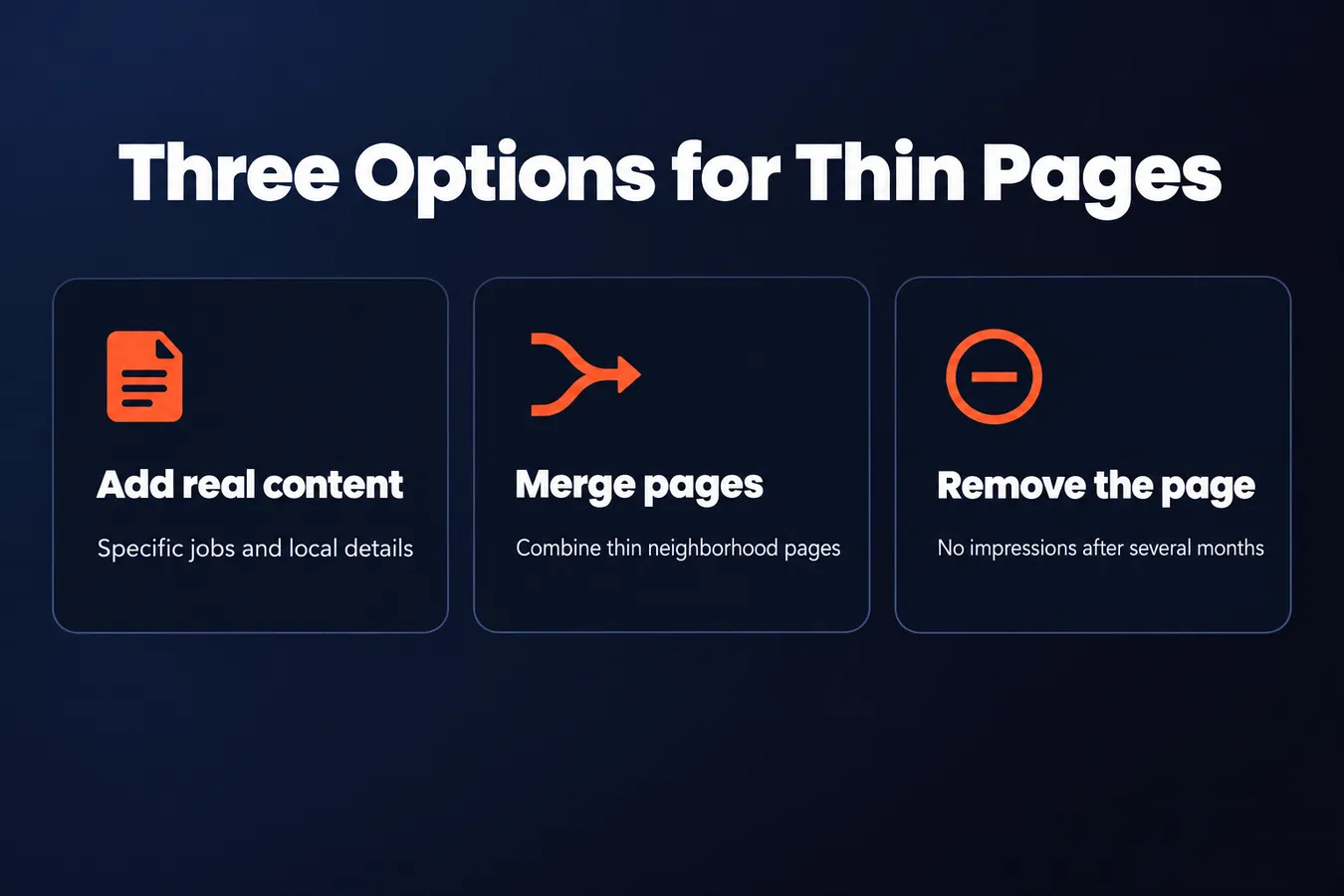
Pull the numbers for each location page every few months. If a page gets no impressions after several months, it's not doing its job. You have three options:
- Give it more real content. Specific jobs, real photos, actual local details.
- Merge it into a broader page. Two thin neighborhood pages often make one decent city page.
- Remove it. A dead page can drag down the rest of your local presence.
Pick one, and don't leave it sitting there.
The best source of local content is the phone.
Look at the questions customers ask when they call. Write down the five or so that come up most, and answer each one on the page. Things like "Do you work on Saturdays in Hollywood?", "Is there parking near the Santa Monica office?", or "Do you need a permit for work in the Mission?" Those answers are local, specific, and usually the stuff competitors skip. They also tend to match the way people actually search.
Keep the answers short and honest. If the answer depends on the job, say so.
Reviews from customers in that area belong on the page too, and so do links to your Google Business Profile and any Facebook activity tied to that location. Keep those current as well, because a page that looks abandoned sends the same signal as one that never changed.
Ways to handle a location that lacks enough content
| Option | What it means | When to use it |
|---|---|---|
| Add real content | Specific jobs, real photos, local details | The page has demand but little detail |
| Merge into a broader page | Combine thin neighborhood pages into one | Several pages each lack substance |
| Remove the page | Take it off the site | The page gets no impressions after several months |
Frequently asked questions
How many location pages should I build?
Fewer than you think. Start with the places where you have a real presence, like an office, a crew, or customers who already call you from there. A page you can back up with a specific job, a local detail, or a real review beats fifty pages that repeat the same text with a different city name. I'd rather see ten strong pages than fifty thin ones.
What makes a location page different enough from the others?
Swap the city name on the page. If nothing else breaks, the page isn't doing any work. Write about the local problems you actually solve, name the streets and landmarks people use, and show photos from jobs in that area. Keep a note of what each page covers that the others don't.
Do I need a separate Google Business Profile for each location?
If you have a separate address, yes. Link each location page to its own profile, and embed a map for that exact address. Mixing them up sends mixed signals about which address belongs to which page. Keep the name, address and phone number identical everywhere, because 'Suite 4' on one site and '#4' on another can look like two businesses.
How do I keep location pages from going thin after they go live?
Plan a small refresh every few months. Add a new job, a photo, or a note about a local issue. Pull the numbers for each page, and if one gets no impressions after several months, either give it real content, merge it into a broader page, or remove it. Dead pages can drag down the rest of your local presence.
Aha Studio
Get the next playbook first
New playbooks and LaunchWatch reports land in Growth Signals, the free newsletter, along with the case studies and how-tos I find worth stealing.
More in Build Local Landing Pages and Visibility
- 13 Ways a Link Building Company Can Win You Local Links Competitors Miss
- How to Track Local SEO Results: The Google Business Profile Metrics That Matter
Explore the full Local SEO and Google Business Visibility hub