New from Anthony Hayes: Aha Studio
Get found by the people searching for what you sell.
Local SEO and Google Business Visibility › Build Local Landing Pages and Visibility
Local SEO tracking
Rank alone won't tell you whether your local search is working. The number that matters is whether your Google Business Profile is producing calls and visits, and you can only see that by reading the profile metrics next to your rankings. This post walks through which metrics to watch and how to connect them to real calls and visits.
A listing can climb the map pack and still produce fewer calls than it did last year.
That's the trap with rank tracking. You check the map position, see it's moved up, and assume things are better. Then the phone stops ringing as often and no one can say why.
If you're trying to work out how to track local SEO results, rank has to sit alongside what people actually do with your listing. Position tells you where you appear. It doesn't tell you whether anyone called.
The numbers that matter are in your Google Business Profile insights.
Those insights show how people found you, what they searched for, and what they tapped on once they got there. Used properly, they let you connect a change in your rankings to a change in calls and visits.
I build marketing tools for a living, and the mistake I see most often is treating the map pack as the scoreboard. A better rank is only useful if it turns into people getting in touch.
The steps below cover the whole process. We'll set a baseline first, then read the search and discovery numbers, then the actions people take on your listing. After that we'll link those actions to real calls and visits, build a monthly report that puts rank, actions and revenue in one place, and figure out when the numbers are telling you to change something.
The steps at a glance:
- Set up your Google Business Profile insights baseline
- Read the search and discovery metrics
- Track the actions people take on your listing
- Tie profile actions to real calls and visits
- Build a monthly report that links rank, actions and revenue
- Know when the numbers are telling you to act
Find this useful? Add us as a preferred source on Google and more of what we publish will show up in your results.
Step 1: Set up your Google Business Profile insights baseline
Before you change a single thing, capture where your numbers stand today. Otherwise you'll have no way to tell later whether a bump came from your work or from something else.
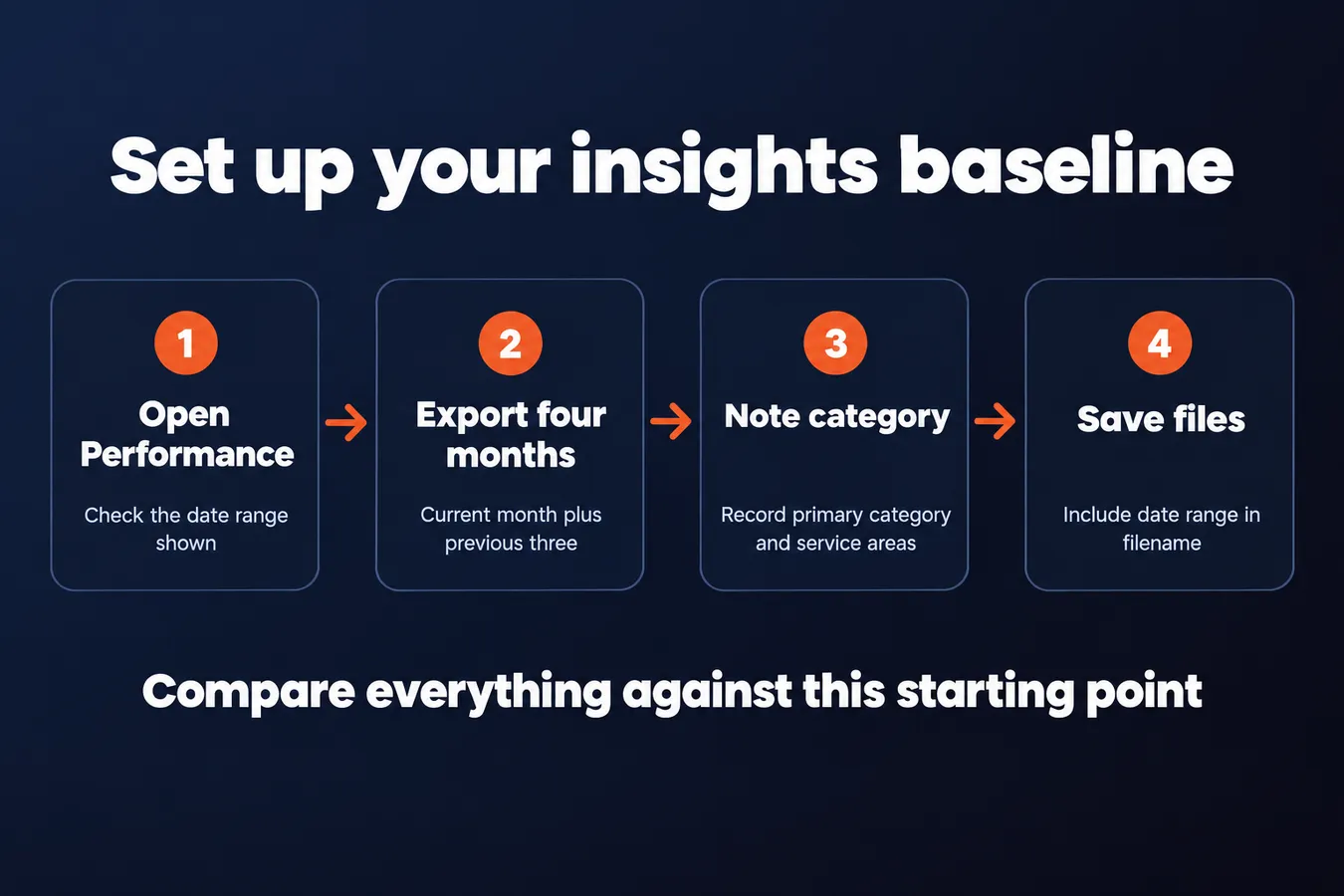
Start in the Performance section of your Google Business Profile. The default date range can shift depending on when you open it, so look at the top and write down exactly which dates you're viewing. Otherwise you'll end up comparing a 28-day window to a 90-day one without noticing.
Export or screenshot the current month and the previous three months. Four months of data gives you something to compare against, and it protects you from one unusually slow or busy month throwing off your read. Save the files somewhere you won't lose them, with the date range in the filename.
Next, check your primary category and your service areas. Make sure they're correct before you go any further. If you change your primary category or add a service area later, the shift will show up in your numbers, and you won't know whether it was the change itself or something you did on the page. Write down what they are today, so you can point to that change if the graph moves.
Once you've got the export and the category and service area notes, you have your starting point. Everything you measure from here gets compared against it.
Step 2: Read the search and discovery metrics
Google Business Profile splits search activity into two groups, and they tell you different things. Name searches are people typing your business name, or something close to it. Discovery searches are people looking for a service in an area, like "plumber near me" or "emergency plumber Springfield." Both matter, but they mean different things.
Name searches show brand recognition. If people are looking you up by name, they've heard of you, been referred to you, or seen your van around town. Discovery searches show whether you're showing up for people who don't know you yet, which is where new customers come from.
Watch discovery searches over time, month by month and across the quarter.
A single month can swing hard, especially for trades with seasonal demand. Furnace calls spike in the cold, and pool and AC work picks up in summer. I'd look at three to six months of data before deciding anything. One slow month usually means nothing.
Next, look at which search phrases come up most. Google shows you the actual queries people used to find your listing, so check whether they match the services you want to be found for. If you do drain cleaning and water heater repair, but the top queries are all about roof leaks you don't fix, you've got a mismatch to sort out before you touch anything else.
Those phrases also tell you where your listing is being matched to a search, which ties into the map and pack results you're tracking across your locations.
Step 3: Track the actions people take on your listing
Views tell you people saw your listing. Actions tell you they wanted something from it. I'd put the actions first, because a call or a direction request is the nearest thing Google Business Profile gives you to a customer raising their hand.
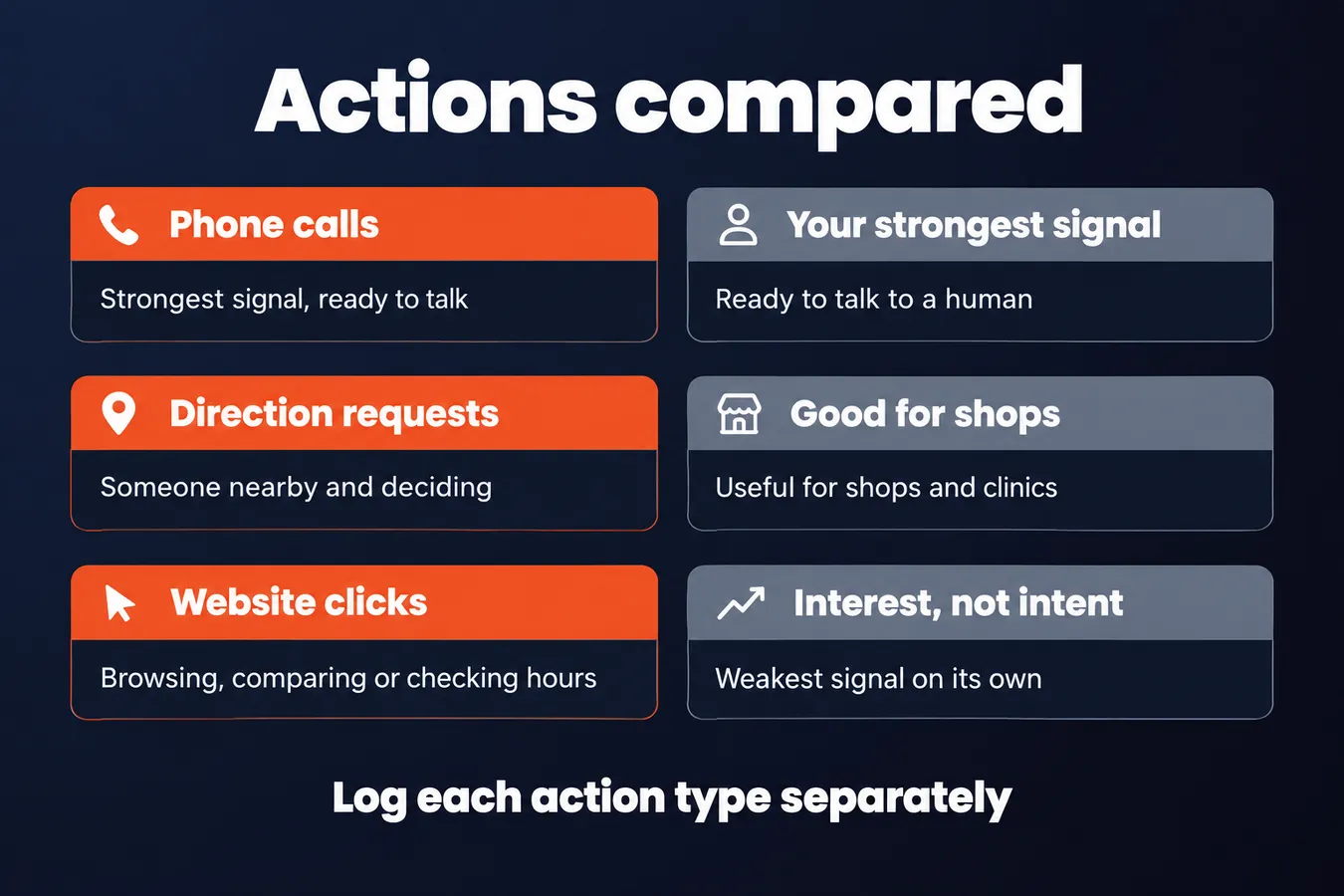
Log three numbers separately: phone calls, direction requests and website clicks. Don't lump them together. Each one means something different.
A call is usually your strongest signal. Someone rang you straight from the listing, which means they're ready to talk to a human about buying.
A direction request often means someone is close to you and deciding whether to walk in. It's a good sign for a shop, a clinic or a restaurant, and less useful for a business that works at the customer's address.
Website clicks are the weakest of the three on their own. People click through to browse, compare, or check your hours, so treat them as interest rather than intent.
Don't judge the raw count alone. A month with 40 calls means little until you compare it with the month before. Look at the trend across several months and you'll spot what's really moving.
Flag any month where actions drop sharply. A dip is worth chasing down. Check whether your hours, phone number or categories changed, whether a competitor took a top spot in the local pack, or whether reviews slowed down.
Photos are the part people skip, and they matter more than you'd think. Check how many photo views your listing gets, and where your photos sit. The top images are what people see first, so weak or out-of-date pictures there can quietly cut how many people act.
Look at your photos the way a stranger would. If the first few are dull, dark or old, swap them out and watch whether the actions in the following months pick up.
Google Business Profile action types compared
| Action | What it usually signals | How to read it |
|---|---|---|
| Phone calls | Ready to talk to a human | Your strongest signal |
| Direction requests | Someone is nearby and deciding | Good for shops and clinics |
| Website clicks | Browsing, comparing or checking hours | Interest, not intent |
Step 4: Tie profile actions to real calls and visits
Google will tell you how many people called your business from the profile. It won't tell you whether any of those calls turned into a job. That gap is where most local SEO reporting goes wrong, so this step is about closing it.
Start with a simple call log. Every time the phone rings, ask the caller how they found you, and write the answer down. Keep a rough count of calls per week next to it. It takes about 30 seconds per call and it's the most honest data you'll get.
Pay attention to the answers that say "Google" or "Maps." Those are the ones the profile is responsible for.
If you can, put a dedicated tracking number on your Google Business Profile. Many call tracking services will give you a separate number for a small monthly fee, and that lets you separate profile calls from everything else (your website, print, referrals). Without that, you're relying on what callers tell you, which is useful but not perfect.
Be honest about what your setup can support. A single-location business with a few calls a week can run this on a notepad. A business with several locations and a busy phone line needs proper tracking, or the numbers will mean very little.
Visits are harder, because a lot of walk-in customers never touch the profile before they arrive. They saw the map pack, remembered the name, and came in. So ask every new customer how they heard about you, and note the "Google" and "Maps" answers. Your profile is working even when the insights screen shows nothing.
Read the log, and check the dashboard against it. The dashboard tells you what Google saw. The log tells you what happened.
Step 5: Build a monthly report that links rank, actions and revenue
Numbers scattered across three screens don't help you decide anything. Put them in one spreadsheet, once a month, and you can actually see what's happening.
Set up five columns for the Google Business Profile numbers: searches, calls, direction requests, website clicks, and logged calls or visits from the month. The first four come straight from your Profile insights. The last one is the number that ties the report to money, so it's the one most worth keeping honest. Ask your team to log every call and walk-in, even the ones that feel small.
Add a note column at the end. Write down anything you changed that month: new photos, a fixed category, a review push, a new service listed. Six months later, that note will save you from guessing.
Next, record your map pack rank for your core keywords in the same row. Check the rank the same way each time, from the same spot if you can, because a rank measured from one street corner can look different from another.
Now compare the rank column against the actions. They often don't line up as neatly as you'd hope. A rank can climb while calls stay flat, and calls can rise while rank barely moves. That gap is useful information, and it tells you where to look next.
Review the sheet once a month and change one thing at a time. If you update photos, categories and review replies in the same week, you'll have no idea which one moved the needle. I'd rather make one change, wait for a full month of data, and then decide what to do next.
Step 6: Know when the numbers are telling you to act
Once you've got a few months of data, the numbers start telling you where to look. You don't need to stare at every metric every week. You need to know which pattern you're looking at.
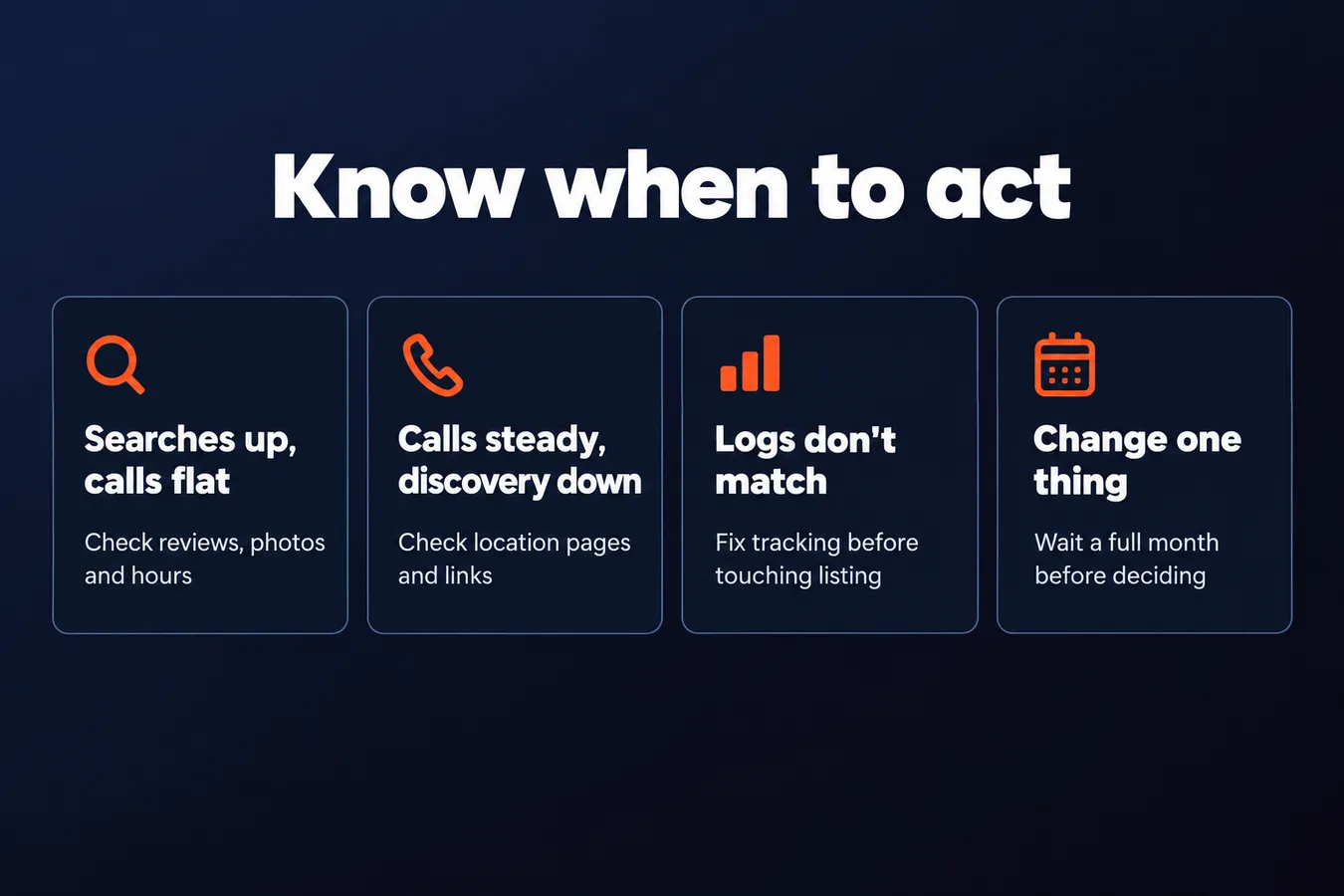
Searches up, calls flat.
People are finding your listing more often, but they aren't ringing. That usually means the listing is failing to convince them once they see it. Check the reviews first. Are the recent ones specific, and does the owner reply to them? Then look at the photos. Old, dark or stock-looking pictures make a shop look like it's closed for business. Last, check the hours. If they're wrong, or missing on public holidays, people will bounce before they call.
Calls steady, discovery searches falling.
Your existing customers still reach you, but fewer new people are finding you through search. That's a visibility problem, and it's slipping quietly. Start with your location pages, because a thin or out-of-date page can drag down your rank for the searches that bring in new customers. Then look at the links pointing at those pages from your local SEO work. If they've dried up, you're losing ground to competitors who are still earning them. Track your rankings across the pack for your main terms, each one separately, so you can see exactly which searches have dropped.
Numbers look fine, but logged calls and visits don't match.
This one trips people up. Your Profile shows plenty of calls and directions requests, but your own records say something different. Before you touch the listing, check your tracking. A call tracking number that isn't set up on the Profile, a form that isn't tagged, or a receptionist who doesn't log anything will all skew your numbers. I've seen this happen more than I'd like. The fix is in your tracking setup, and no amount of tweaking the listing will solve it.
Plain and simple: pick the pattern that matches your numbers, then go to the one thing it points to. Don't change everything at once, or you won't know what worked.
Frequently asked questions
How long should I wait before judging whether a change to my Google Business Profile worked?
Give it at least a full month of data before you decide anything. A single slow or busy month can swing hard, especially for seasonal trades, so I'd look at three to six months of trend before deciding a change failed or worked. Change one thing at a time so you know what moved the numbers.
Why does my map pack rank go up but my calls go down?
Rank only tells you where you appear. It says nothing about whether anyone acts on that appearance. If the rank climbs while calls stay flat, check your reviews, photos and hours first, because those are what people see once they're looking at your listing. The gap between rank and actions is useful information, and it points you toward what to fix next.
Which Google Business Profile action should I pay the most attention to?
A call is usually the strongest signal, because someone rang you straight from the listing and is ready to talk to a person about buying. Direction requests are good for shops and clinics, and website clicks are the weakest on their own since people click through to browse. Log all three separately instead of lumping them together.
How do I know which Google Business Profile calls actually came from the listing?
Ask every caller how they found you and write the answer down, paying attention to the ones that say Google or Maps. If you can, put a dedicated tracking number on your profile, which many call tracking services offer for a small monthly fee. Without that, you're relying on what callers tell you, which is useful but not perfect.
My Take: I've watched this trap play out more than once. The map pack looks like the scoreboard, a rank climbs, and everyone feels good about it, then the phone quietly gets quieter. My own rule is to treat rank as a leading indicator and calls as the result. If the two don't line up, I stop looking at the listing's position and start looking at what someone sees when they land on it: the reviews, the photos, the hours. Those are usually where the leak is. The mistake I see most is changing several things in the same week, then having no idea which one did anything. I'd rather make one change, wait out a full month, and read the log before I touch anything else. The call log is the part people skip, and it's the part that tells you the truth. Ask every caller how they found you and write it down. It takes about 30 seconds a call, and a dashboard can't give you that.
Aha Studio
Get the next playbook first
New playbooks and LaunchWatch reports land in Growth Signals, the free newsletter, along with the case studies and how-tos I find worth stealing.
More in Build Local Landing Pages and Visibility
- Location Pages That Rank for Local Searches: How to Build a Unique Page per City or Neighborhood Without Creating Thin D
- 13 Ways a Link Building Company Can Win You Local Links Competitors Miss
Explore the full Local SEO and Google Business Visibility hub