New from Anthony Hayes: Aha Studio
Get found by the people searching for what you sell.

Local SEO and Google Business Visibility › Research Local Competitors and Keywords
Local SEO for lawyers
Most people who search for a lawyer call one of the first few businesses they see, so your Google Business Profile does more of the work than almost anything else on your site. This post walks through 13 local SEO moves for law firms, grouped into four areas, in the order we'd tackle them.
Most people who search for a lawyer call one of the first three businesses they see.
That's the whole game in local search. If your firm isn't in that top three on the map pack, the rest of your website barely gets a look.
Here's what you'll get from this post: 13 local SEO moves for law firms, in the order I'd work through them.
The first few are about your Google Business Profile, because that's where the calls come from. After that come the pages, the reviews and citations, and finally the tracking so you can tell what's actually working.
I've been building marketing software since 2011, and I build all of it with AI now without writing the code myself. Most of what I know about local pages comes from building them, and from seeing which ones bring in calls.
We'll start with the profile, since it's the one thing you can fix this afternoon and see movement on.
This post sits inside a wider look at local SEO for dentists, lawyers and real estate agents, so the moves here lean toward how legal searches actually happen.
The 13 moves at a glance
| Move | Area | Key detail |
|---|---|---|
| Claim and verify your profile | Google Business Profile | Use the exact firm name |
| Pick the right primary category | Google Business Profile | Choose the most specific category |
| Match name, address and phone everywhere | Google Business Profile | Use one format consistently |
| Fill in services, photos and hours | Google Business Profile | Use real photos, not stock |
| Write one page per practice and city | Pages | Avoid swapping only the city name |
| Write about local problems | Pages | Answer questions clients ask on calls |
| Make attorney bio pages carry local weight | Pages | Include bar admissions and courts |
| Ask for reviews the right way | Reviews and citations | Ask at case close, send direct link |
Find this useful? Add us as a preferred source on Google and more of what we publish will show up in your results.
Get your Google Business Profile right first
1. Claim and verify your Google Business Profile
This is the first thing to fix, and it costs nothing.
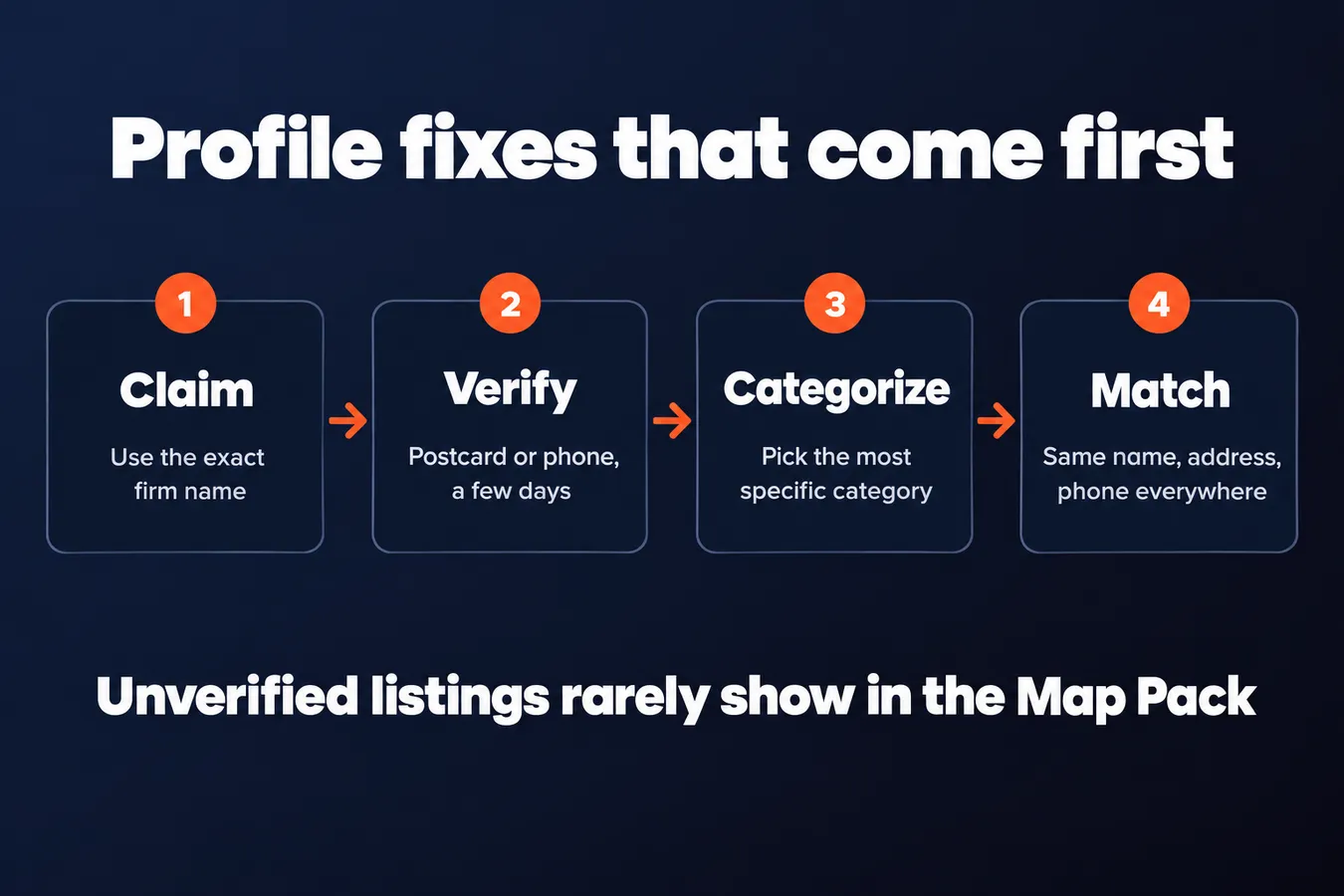
Claim your listing under the exact name your firm uses everywhere else. If your website says "Hayes & Partners LLP," don't list it as "Hayes Law" on Google. Google compares names across the web, and a mismatch makes it harder to trust the listing.
Verification is usually a postcard or a phone call, so budget a few days to a couple of weeks. Don't sit around waiting on it.
Unverified listings rarely show up in the Map Pack. That's the block of three results with the map, and it's where most of the calls come from. If you haven't verified, you're mostly invisible there.
2. Pick the right primary category
Your category decides which searches you can show up for. Pick the most specific one for your main practice, like Personal Injury Attorney, rather than the broad Lawyer. A broad category puts you in a crowd you don't need to compete in.
Add secondary categories only where you really handle that work. If you do estate planning on the side, fine. If you took one divorce case in 2019, leave it off.
Check what the top firms in your city picked and compare. Search your practice area in your town, look at the firms ranking in the Map Pack, and see what they chose. That tells you what Google is rewarding locally.
3. Make your name, address and phone number match everywhere
Consistency is a basic trust signal for Google and for clients. If your address is "Suite 400" on your site and "Ste. 400" on your profile, that's a small mismatch, but it adds up across directories.
Use the exact same firm name, address and phone format on your site, your profile and every directory. Pick one format and stick to it.
Use a local number that is tracked to your Google listing. A local number tells Google and the caller that you're actually here. Toll-free numbers tend to blur that signal.
Spell out suite numbers the same way every time. Pick "Suite" or "Ste." and never switch.
4. Fill in services, photos and business hours
A complete profile gives Google and the reader more to match against. Empty fields are wasted chances.
List each practice area as a service with a short description. Keep it plain: what you handle, and who it's for. This is where your core services and keywords belong, written the way a client would say them.
Upload real photos of the office, the team and the building entrance. A stock photo of a gavel tells a client nothing about where to find you, and clients use photos to check that a place is real before they call. Real photos also help people find the door when they walk in.
Keep hours accurate, including holidays, because wrong hours cost calls. Someone searching at 7pm on a Sunday who sees "Closed" and a Monday opening time may call your competitor instead. Check the hours before every holiday weekend.
Build pages that match how people search locally
5. Write one page per practice area and city
Local searches pair a legal problem with a place, so your pages should do the same. Someone typing "divorce lawyer" with a city name wants to see that you handle divorce where they live, with pages built around that city.
Build a page for each practice area in each city you actually serve. Use real local details: the courts you appear in, the county where the case gets filed, the neighborhoods or towns you cover.
Thin pages that just swap the city name tend to do poorly. Google can tell when the same paragraph is repeated across ten locations, and so can the person reading it. Write each page as if a local client would read it.
6. Write about local problems that affect your clients
Specific local detail is what separates a useful page from filler. Any writer can state that a custody case depends on the child's best interests. What helps is explaining how your county's court handles that case type, based on your own experience.
Answer the questions clients in your town actually ask on the first call. Those questions make good headings and good content, and they're the same words people search with.
Keep each page focused on one practice area so it's easy to scan. A visitor should find the answer to their question within a few seconds, or they're gone.
7. Make your attorney bio pages carry local weight
People hire a person, so your bio pages need to show who the attorney is and where they work. A bio that says "experienced litigator" and nothing else gives a searcher nothing to trust.
Include the bar admissions, the courts each attorney practices in, and the local bar associations they belong to. These details are concrete, checkable, and tied to location.
Mention community involvement only if it's real. A made-up charity line is worse than no line at all.
Link each bio to the practice pages that attorney handles. That connects the person to the service, and it helps a visitor move from "who is this lawyer" to "can this lawyer help me."
Get reviews and citations working for you
8. Ask for reviews the right way, every time
Reviews matter a lot in local rankings, and they matter even more to the person deciding who to call. Someone searching for a lawyer is often scanning stars before they read a single line of your site.
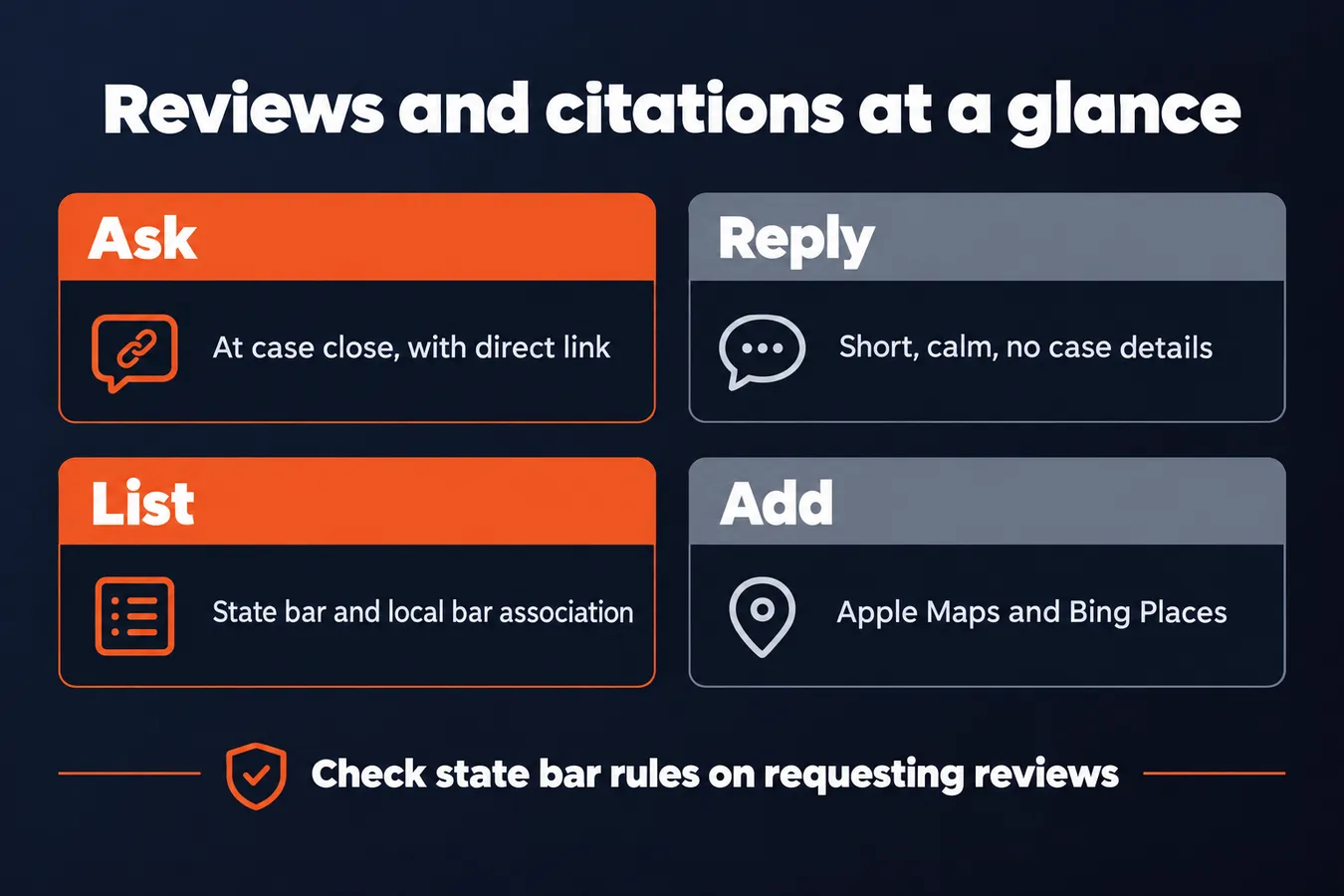
The best time to ask is at a natural finish line, like when a case closes or a settlement check clears. The client is relieved, grateful, and not in the middle of a stressful fight with you. Asking then feels like the normal next step, and it is the right moment to ask.
Send them the direct review link, too. Don't just say "leave us a review on Google" and hope they dig it up. Make it one tap from their phone.
Check your state bar's rules on requesting reviews before you start. Some states have specific guidance about soliciting testimonials from clients, and you don't want to find that out from a complaint.
9. Reply to every review, including the bad ones
Here's the thing: a potential client reads your replies as closely as they read your reviews. A calm, polite reply to a bad review tells them more about how you handle trouble than any five-star rating does.
Keep replies short and professional. Thank the person for the feedback, say you're sorry the experience fell short, and invite them to continue the conversation offline. Leave out anything that reveals case details.
Never confirm in a public reply that someone was your client. Even "We're sorry to hear about your case" can break confidentiality rules, so keep it general.
Try to respond within a few days when you can. Silence on a bad review looks worse than a plain, measured reply.
10. Get listed in legal and local directories
Citations are mentions of your firm's name, address and phone number on other sites. They help Google confirm that you exist and where you are, and they're one of the simpler local SEO jobs you can knock out in an afternoon.
Start with the sources that carry the most weight for a law firm: your state bar listing, your local bar association, and the major legal directories. These are the places a legal-minded searcher and Google both trust.
Then add the big general directories that people forget about, like Apple Maps and Bing Places. Plenty of firms have a Google Business Profile and nothing else, and that leaves easy ground on the table.
Fix old and wrong listings when you find them, especially after a move. An outdated suite number or a former phone line sends mixed signals, and it's the kind of error that quietly costs you calls.
Track what the work is doing
11. Track calls, form fills and direction requests from your profile
Without tracking, you're guessing about which changes brought in clients.
Start with the call and direction numbers inside Google Business Profile. They're free, they're already there, and they show you how often people tap to call or ask for directions from your listing. It's a rough picture, but it's a starting point.
The catch is that a single phone number tells you nothing about where the calls came from. Give each channel its own tracking number: one for your Google profile, one for your website contact page, one for your ads. Then you can see which one is actually ringing.
Ask every new client how they found you, and write the answer down. Don't skip this, even though it feels a little awkward on the intake call. Clients often remember a specific review or a search they ran, and that answer tells you more than any dashboard will.
12. Check your rankings for the searches that bring in cases
Rankings only matter for the searches that lead to paying clients.
Pick your top practice area and your city, then check the Map Pack for that exact search. Don't check your own search ranking for "personal injury attorney" in general, check the one that brings you cases.
Check from several spots across town. Results can shift a lot depending on where the searcher is standing, so one check from your desk tells you very little. I'd pick four or five points around the city and run the same search from each.
Track the same searches every month so you can see real movement. A single snapshot can mislead you. Keep a simple sheet with the search, the location, and where you showed up, and the trend will tell you whether your work is paying off.
13. Set a simple monthly routine
Local SEO is an ongoing job that needs regular attention.
Each month, post an update to your Google Business Profile, ask for reviews from recent clients, and check your listings for errors. Wrong hours or an old address can quietly cost you calls, so the check is worth the ten minutes.
When you have the time, add one or two new local pages or updated case results. Keep them specific to your practice areas and neighborhoods.
Once a month, review the call and form numbers, and drop whatever isn't working. Plain and simple: if a page or a post isn't bringing in clients, stop spending time on it and put that time where the calls are coming from.
Frequently asked questions
Should I use a local phone number or a toll-free number on my Google profile?
Use a local number that's tracked to your Google listing. A local area code tells Google and the caller that you're actually in that town, while a national toll-free number tends to blur that signal. Give each channel its own tracking number so you can see which one is actually ringing.
How many cities should I build practice pages for?
Build a page for each practice area in each city you actually serve, and nowhere else. Use real local details like the courts you appear in and the neighborhoods you cover. Thin pages that only swap the city name tend to do poorly, so write each one as if a local client were reading it.
Where should I check my rankings?
Check the exact search that brings in cases, like personal injury attorney plus your city. Run it from four or five spots across town, and from the office too, because results shift depending on where the searcher stands. Track the same searches every month to see the trend.
Do I really need to reply to bad reviews?
Yes. A potential client reads your replies as closely as the reviews themselves, and a calm, polite reply tells them how you handle trouble. Keep it short, never confirm in public that someone was your client, and try to respond within a few days.
Aha Studio
Get the next playbook first
New playbooks and LaunchWatch reports land in Growth Signals, the free newsletter, along with the case studies and how-tos I find worth stealing.
More in Research Local Competitors and Keywords
- Competitor Analysis for Local SEO: How to Compare the Map Pack Businesses Beating You
- Local Business SEO Keyword Research: How to Pair Service Terms with Locations That You Can Actually Rank For
Explore the full Local SEO and Google Business Visibility hub