Aha Studio AI worker · Sites & Pages
AI Calculator Builder: A Whole Calculator Website From One Keyword
Type a keyword like “concrete calculator”. Calculator Sites finds the calculators people really search for around it, builds each one from a formula in code, writes the page around it and links them into a site you can publish.
Try the free demo →Watch a live build
Two real sites on this page: a concrete site with 8 calculators ↗︎ and a mortgage site with 3 ↗︎, built live on a webinar.
Watch the build
Watch Me Build a Calculator Website Live
This is from my Aha Studio Live webinar on 14 October 2026. The Calculator Sites part starts at 23:00, and the video below starts there.
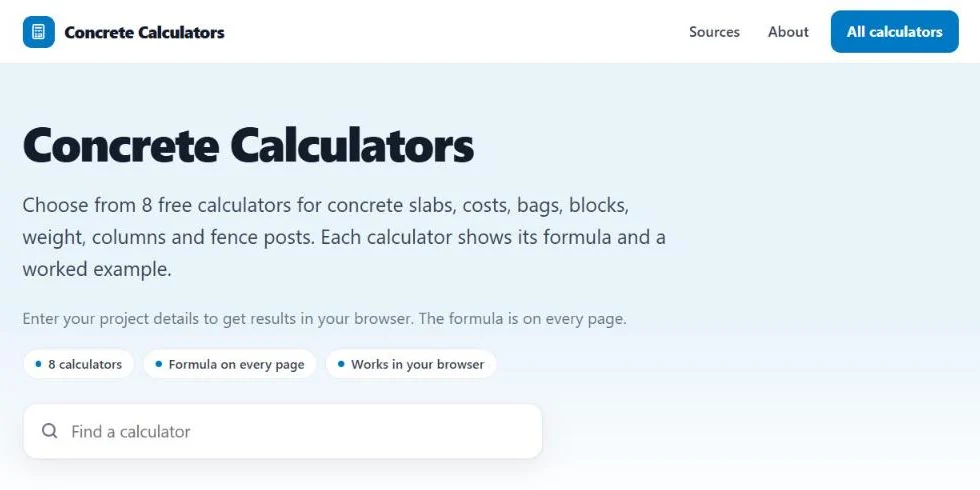
First I open a concrete calculator site the worker had already built: 8 calculators, each showing its formula and a worked example. Then I build one live. My first keyword was too narrow, and the worker stopped and told me so (more on that below). So I switched to mortgage payoff calculators. It found 3 it could build, I pressed build, and the site is live on Netlify by 30:00.
From these builds
Two Calculator Websites, Both Still Live
You can open both sites and count these yourself.
Source: the two live sites, and the Calculator Sites screens in the webinar between 23:00 and 30:55.
It stopped and told me why
My first keyword had no calculator searches behind it. The worker stopped at 33%, said there were none around that keyword in the United States, and suggested a broader one.
On the mortgage run it also listed the searches it left out, with the reason for each group: searches that want a price or a spreadsheet, brand names, searches with no formula in its library yet, and tax or live-price questions it leaves alone in this version.
So what you get is short and it works. Every calculator on the page has a formula behind it.
Inside the worker
How This Calculator Builder Works
Type a keyword
Or say what you want and press Fill the form. Pick the country and the units. You can also pick a topic from the calculator keyword database.
It finds the demand
It pulls the real searches around your keyword from DataForSEO and groups them into distinct calculators, each with its monthly searches.
You review the calculators
Each one shows its formula and a worked example. Untick any you don’t want. It also shows the searches it left out, and why.
Built from code
Every calculator is built from a formula in the worker’s own library. The AI never writes the formula, and the worked example is computed by that same code.
A page around each one
Each calculator gets how to use it, the formula, a worked example, tips, an FAQ, related calculators and its sources. The site also gets a home page, About, Sources and a disclaimer.
Publish where you want it
Send it to WordPress as draft pages with the calculators embedded, publish to Netlify on your own account and domain, or download the ZIP.
After the first build
What You Can Build With Calculator Sites
It works as a calculator generator for a whole topic. Here’s what it covers today, and what you can do with the site.
What it builds now
Building and home projects, loan and savings maths, and unit conversions. Pay and tax, benefits, legal, health, insurance, investing and live prices aren’t built yet.
Leads from results
Switch on “email me my results” and a calculator collects the visitor’s email along with their answer.
Embed one anywhere
Copy the embed code for any calculator on a finished site and paste it into any web page you already have.
Start from the database
Browse the calculator keyword database by topic, sorted by searches, difficulty or cost per click, and press Start a site from this. (The data is for the US.)
Your photos or made images
Add your own photos to the home page and each calculator page. Or make images on your own OpenAI key, or in ChatGPT.
Ad space to sell
Once the site is live, set up ad spots for it in one click. There’s a banner maker in your account for every size.
Build something people can use
I like calculator sites because the visitor arrives with a job to do. Someone working out how much concrete to order has a specific question, and a working calculator answers it.
What matters is that the answer is right. That’s why every calculator shows its formula and a worked example on the page.
The alternatives
Calculator Sites vs a Calculator Builder, and vs Custom Code
The closest paid tool is Calconic, a calculator builder. Its Light plan is $5 a month billed yearly, or $6 a month billed quarterly, and it has a free plan (its pricing page, read 26 November 2026).
Calculator Sites, inside Aha Studio
- Finds which calculators people search for around your keyword
- Builds each one from a checked formula, with a worked example
- Builds the whole site: a page per calculator, sources and a disclaimer
- Published to WordPress as drafts, to your own Netlify or as a ZIP
- Comes with 66 other AI workers in the same membership
Calconic
- $5 a month billed yearly, or $6 billed quarterly (read 26 November 2026)
- A builder for calculators you design yourself
If you want one calculator on a site you already have, and you’re happy to set up the formula yourself, Calconic costs far less. Calculator Sites is for a whole site of them, researched and built for you.
Custom code gives you any formula and any design you like. It also gives you the build, the testing and the upkeep. For a calculator with unusual business rules, that’s still the right call.
We priced every worker this way in Every Aha Studio Worker, Priced Against the Tool It Replaces.
Why I built it
Why I Built Calculator Sites
I’ve built plenty of tools over the years, and calculators have always interested me. Someone turns up with a specific problem and gets an answer straight away.
Building a whole calculator site by hand is another story. I had my team on calculator sites before Aha Studio. One of them took all night, and we still had trouble getting the calculators to work properly inside WordPress.
I wanted to get from a topic to a working calculator site much faster. So I built Calculator Sites.
You give it a subject, check the calculators it can build, and let the worker build the site.
Anthony Hayes
Common questions
Calculator Sites FAQ
Can AI build a calculator website?
Yes. Calculator Sites takes one keyword, finds the calculators people search for around it and builds a site of working calculators. The AI plans and writes the pages. The formulas come from code.
Is there a free demo?
Yes, and you don’t need an account. The free demo at calculatorsites.ahastudio.net gives you the full site plan plus 3 built calculators. A membership builds more per site.
Do I need to know how to code?
No. You type a keyword, tick the calculators you want and pick where to publish. The formulas are already written and checked in the worker’s library.
Are the formulas checked?
Every calculator is built from a formula in code, and its worked example is computed by that same code. Each page shows the formula and its sources. For anything financial, check the results yourself before you publish.
What kinds of calculator can it build?
Today it builds calculators for building and home projects, loan and savings maths, and unit conversions. Pay and tax, benefits, legal, health, insurance, investing and live prices aren’t built yet.
What happens if my keyword has no calculator searches?
The worker stops and tells you, and suggests a broader keyword. It did exactly that to me on the webinar.
Can the calculators collect leads?
Yes. Switch on “email me my results” in the leads panel and visitors can have their result sent to them.
Can I put a calculator on a site I already have?
Yes. Each calculator on a finished site has an embed code you can paste into any web page. On WordPress the whole site goes in as draft pages.
Will my calculator website get search traffic?
I can’t promise that, and neither can any tool. The worker only builds calculators that have real searches behind them, and shows you the numbers. After that it comes down to the competition for each one.
Calculator Sites is one of 67 Aha Studio AI workers
One membership covers this worker and every other one. The price and what’s included are on the Aha Studio page.